EXAMPLE 01
The reunion
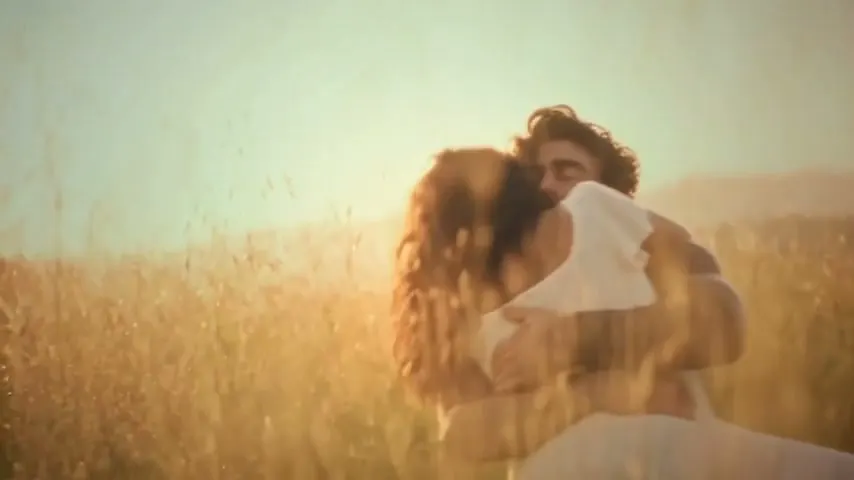
A tense encounter softens into recognition. Then, a memory of life together.
Provided example · 20.74s · 854×480 · Sound availableCurrent generator: 15s · 720p adaptationUse this template
Make a zombie couple video from two familiar faces.
Create a 15-second AI love story with sound effects, then download a 720p MP4.
A tense encounter. A familiar face. A memory worth keeping.
Provided example at its original length and resolution. Your video is a 15-second, 720p adaptation. Faces, movement, and framing may vary.
Each zombie couple video follows an encounter, an embrace, and a memory. Look at both characters throughout the complete example.
A tense encounter softens into recognition. Then, a memory of life together.
Provided example · 20.74s · 854×480 · Sound availableSee another pair of characters move through the hug and the warm memory.
Provided example · 20.74s · 854×480 · Sound availableA zombie couple video is a two-character AI story: a survivor recognizes his partner after she becomes a zombie. A tense encounter turns into an embrace, followed by a warm memory of their life together.
The meme’s emotional hook is that shift—from fear to recognition, then affection. Your two portraits give the story a personal meaning.
Read the story guide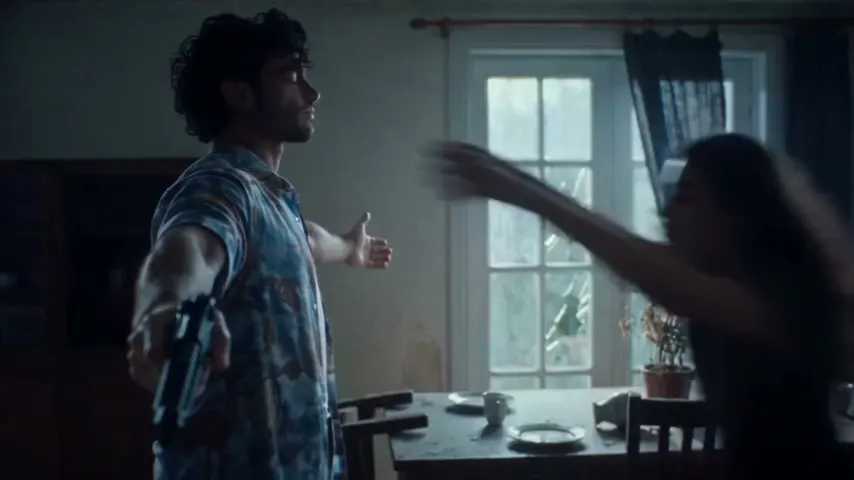
This zombie couple video generator keeps the two roles and output details clear before you generate.
Your zombie couple video starts with separate photo slots for each role. The female partner has two states—zombie and human—but one identity.
Add your portraitsSee the full template story before uploading. No blank prompt box or scene-by-scene setup is needed.
Watch the complete exampleEach zombie couple video is a 15-second MP4, exported at 720p with scene sound effects. Choose portrait or landscape at the same cost.
Compare the packsUpload one clear portrait for each role. Make sure both people have agreed to their photos being used.
Pick 9:16 or 16:9. Review the roles, fixed 15-second specification, and 100-credit cost.
Generate your clip, check the faces and ending, then download the MP4 with its sound effects.
For your zombie couple video, use two different, ordinary portraits with one clearly visible face in each. Keep the face large enough to inspect and include the hairline. A group photo, sunglasses, or a cropped forehead can make the wrong features harder to recover. Do not apply a zombie filter first: the template creates that appearance.
Upload checks validate image type and size. They do not verify faces, consent, or likeness. If an image is rejected, choose a clearer portrait instead of repeatedly uploading the same file. Read the complete photo checklist before spending credits.
Choose 9:16 for a vertical post and 16:9 for a landscape frame. Both produce a 15-second 720p MP4 and cost 100 credits. Landscape gives the two people more horizontal room; portrait adapts the composition. Changing the ratio after generation creates a new paid task, so decide where you want to share the clip first.
Use the zombie couple video template if you like the example. Add your portraits, pick the format, and generate without assembling separate scenes.
Plan the encounter, hug, and memory. Create the shots using your chosen tools, then edit them into your own sequence.
A zombie couple video is a new generation, not a guaranteed face swap. Faces, hands, and movement can change. Review the examples and support rules before paying.
If a zombie couple video looks wrong, keep the task ID and note the timestamp before deleting it. Follow the symptom-by-symptom troubleshooting guide. A finished but imperfect result is different from a confirmed technical failure.
If a technical failure leaves you without a deliverable video, the generation credits return to your account. This is separate from a cash refund.
Read refund rulesWatch the whole clip and note where the issue appears. A completed video may still have imperfections; satisfaction is not guaranteed.
Get help with a videoCheck the photo labels you confirmed. Include your task reference and describe what the output shows instead.
Read troubleshooting tipsYour portraits are processed for generation. Download results promptly and review the active storage and retention policy before uploading portraits.
How files are handled| What matters | This couple template | A single-person effect | A custom workflow |
|---|---|---|---|
| The result | A couple’s encounter, hug, and memory | One person with a zombie appearance | A story you plan and assemble |
| People | Two portraits, two fixed roles | One person as the focus | Depends on your tools and scene plan |
| Creative control | Photos and 9:16 or 16:9 framing | Appearance or effect settings | Scenes, timing, and editing |
| Before you start | Check the example, 15s output, and price | Check export limits and cost | Check identity consistency and tool costs |
One zombie couple video uses 100 credits. Every pack includes the same 15-second story, 720p download, and sound effects.
Try your first version.
100 credits · $8.90 per generation
Try different portraits or share another story.
500 credits · $4.98 per generation
For creators making several separate videos.
2000 credits · $3.00 per generation
Purchases open when video generation and secure checkout are ready. No payments are currently collected.
Counts refer to generations, not guaranteed perfect results. Review the full example before buying. Read refund and support rules.
One generation uses 100 credits. Starter covers one try for $8.90; Value covers five for $24.90; Creator covers twenty for $59.90. Pack counts describe attempts, not guaranteed keeper videos. Trying new portraits or a second format uses another generation.
Preview the story and prepare both photos first. Compare zombie couple video prices and refund rules, including current eligibility for unused packs. The DIY guide is free to read; third-party tools may charge separately.
Prepare your photos, choose the roles, and follow the automatic or DIY workflow.
THE STORYUnderstand the encounter, the embrace, and the warm memory in this version.
TROUBLESHOOTINGWhat to check when a face changes, a character swaps, or the output is wrong.
The details about your photos, video, and purchase.
Bring two clear portraits to your zombie couple video. Choose your frame, check the roles, and review the price before you generate your 15-second story.
Make my video →